Cards Mobile Wallet App Review – Apk5Star
I used to be that person with a stuffed wallet—loyalty cards falling out, coffee shop stamp cards gone missing, and bus passes buried somewhere between receipts I forgot to throw away. Then I started looking for something that could just hold it all digitally, in one place, without turning my phone into ten different apps. That search led me to Cards – Mobile Wallet, and honestly it changed how I think about carrying cards entirely.
If you’ve been looking for a reliable digital wallet app that goes beyond basic payment cards—one that handles loyalty programs, transport passes, ID cards, and more—this review is worth your time. I’ve spent a good stretch using this app day-to-day, and on Apk5Star we always look at apps from a real-usage perspective rather than just repeating what the store listing says. So let’s get into what Cards Mobile Wallet actually does, where it shines, and a few honest things to keep in mind.
What Is Cards Mobile Wallet?
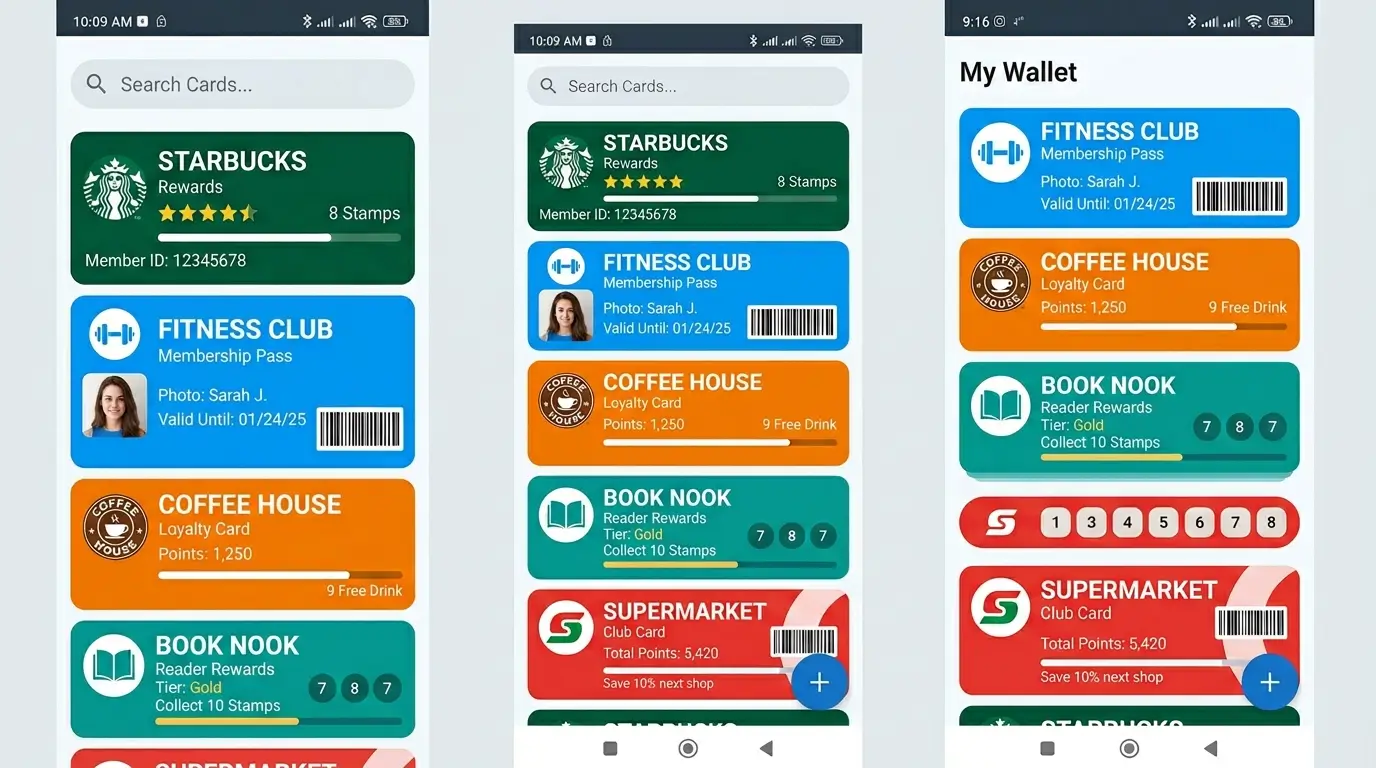
Cards – Mobile Wallet is a productivity app built by NOVAMIND AI LTD. and available on Android. The concept is simple but genuinely useful: instead of juggling separate apps or carrying a thick stack of physical cards, you store everything inside one secure app. Payment cards, loyalty programs, transport passes, key cards, ID documents, event tickets — all of it lives under one roof.
It currently holds over 10 million downloads on the Play Store and a 4.6-star rating from more than 311,000 reviews. That’s not a number you hit by accident. People are using this regularly, and most of them stick with it.
The app supports two main ways to use your cards at terminals or checkouts. First, NFC (Near Field Communication) tap-to-pay, where you tap your phone on a compatible terminal just like you would a contactless physical card. Second, barcode scanning, where the cashier scans a barcode displayed on your phone screen. Between those two methods, you can cover the vast majority of real-world scenarios.
Who Actually Needs This App?
This is where I think a lot of reviewers miss the point. Cards – Mobile Wallet isn’t really competing with Google Pay or Apple Pay for bank transactions. It’s filling a completely different gap.
Think about the last time you stood at a checkout counter and couldn’t find your supermarket loyalty card. Or the time you missed a discount because you left your coffee stamp card at home. Or the bus ride you nearly missed because your transit card was in your other bag. That’s exactly the problem this app solves.
It’s built for people who carry more than just payment cards. Gym membership cards, student IDs, library cards, work access badges, cinema tickets, and hotel key cards — all of those can sit inside this one app. You open it, tap the card you need, and you’re done.
Frequent travelers particularly benefit here. Managing metro passes across different cities, storing event tickets, keeping transport cards organized — it becomes much less stressful when everything is in one place.
Key Features Worth Knowing About
NFC Tap-to-Pay Support
The tap-to-pay feature works through NFC wireless technology, letting you pay or authenticate by simply tapping your phone on a compatible reader. This works for a good range of card types, though it’s worth noting that availability depends on your country’s regulations and the specific card brand’s technology support. Not every card or every region will have full NFC functionality, so it’s sensible to check before relying on it for a critical situation.
Barcode-Based Card Presentation
For loyalty cards and membership programs, barcode presentation is actually the more universally useful method. You pull up the card on screen, the cashier scans the barcode, and the system registers your points or discount. This works essentially everywhere barcodes are accepted, with no regional restrictions.
Smartwatch Compatibility
One feature that genuinely surprised me is the Android Smartwatch support. You can access your cards directly from your wrist, which is convenient during workouts or situations where reaching for your phone is inconvenient.
In-App Notifications
The app can send you notifications from your stored cards — useful for cards that have expiry dates, ticket reminders, or loyalty programs that push offers. It keeps you from missing something important without having to open the app manually.
Security Layer
The app uses fingerprint scanning or PIN code access as the first barrier to entry, paired with industry-standard encryption for stored data. Since this app holds sensitive card information, having that security layer is non-negotiable. It’s there, it works, and it’s not cumbersome to set up.
Card Categories You Can Store
One of the stronger points of Cards – Mobile Wallet is how broad the card type support actually is. Here’s a proper breakdown:
| Card Category | Examples |
|---|---|
| Loyalty Cards | Supermarkets, coffee shops, pharmacies |
| Finance Cards | Credit, debit, ATM cards |
| Transport Cards | Bus, train, metro passes |
| Identity Cards | Driver’s license, student ID |
| Tickets | Concert, cinema, event tickets |
| Key Cards | Work access, home entrance, car keys |
That coverage is genuinely wide. Most digital wallet apps focus on payment cards and maybe loyalty programs. Getting transport and identity documents into the same place is where Cards – Mobile Wallet earns its broader appeal.
Real-World Performance: What Users Say
With over 309,000 ratings, the app has a clear enough track record to draw real conclusions from. The 4.6-star average holds up well, and the dominant feedback theme is that the app does exactly what it promises — it stores and displays your cards reliably.
Some users with large card collections report that managing ten or more cards feels genuinely streamlined compared to using separate apps. The quick-access interface means you’re not digging through menus when you’re at a checkout counter.
There are honest limitations too. NFC functionality doesn’t work for every card type in every region, and a small number of users note that some features are restricted depending on where you live. The app is transparent about this in its own description, which is at least straightforward rather than overselling.
How Cards Mobile Wallet Compares to Google Wallet
If you’re wondering why you’d use this over Google Wallet, the answer comes down to scope. Google Wallet is excellent for bank card payments and passes that are officially supported by Google. Cards – Mobile Wallet is trying to cover everything else — the physical plastic loyalty cards, the barcode-based transit tickets, the membership cards that no major wallet app officially supports.
Think of them as complementary rather than competing. Many users actually run both. Google Wallet handles the payment side, Cards handles the organizational side.
What Apk5Star Thinks Overall
At Apk5Star, we review apps based on genuine utility and whether they hold up under regular use. Cards – Mobile Wallet passes that test. It’s not a flashy app — it doesn’t need to be. It does one thing — keeps all your cards in one secure, accessible place — and it does that reliably.
The 10 million download count and the rating consistency across a large review pool tell you this isn’t a novelty app. People install it and keep using it. That kind of retention matters more than any feature list.
The minor caveats around regional NFC limitations are real but not deal-breakers for most users. Barcode-based access works universally, and for the majority of what people store in here — loyalty cards, tickets, transport passes — that’s all you need.
If your physical wallet is starting to feel like a problem you’ve been ignoring, this app is a clean, practical solution.
Frequently Asked Questions
Is Cards Mobile Wallet safe to use?
Yes. The app uses fingerprint or PIN code access plus in-transit encryption for all stored data. It’s rated 3+ on the Play Store and developed by a registered company with publicly listed contact information.
Does it work without internet?
For displaying barcodes and cards stored in the app, you don’t need a live internet connection. Network access would be needed for syncing or notifications from card providers.
Can I use it on a smartwatch?
Yes. The app supports Android Smartwatch, so you can access cards directly from your wrist.
Does NFC work for all cards?
No — NFC functionality depends on your card provider’s technology and your country’s regulations. Some cards and regions may not support wireless NFC tap-to-pay through this app.
Is the app free?
The app is free to download and contains ads. There are in-app purchase options available for additional features.
How many cards can I store?
The app does not advertise a hard limit on card storage. Users with large card collections use it regularly without reporting storage issues.
Final Thoughts
The physical wallet problem is one that quietly builds up over time — loyalty cards you don’t scan because you can’t find them, transit passes you miss, memberships you forget to use. Cards – Mobile Wallet addresses that whole category of friction in a genuinely practical way.
For anyone serious about going lighter with their physical wallet, this app is one of the more capable options available on Android today. Apk5Star consistently highlights apps that have real staying power, and this one earns its place.
DISCLAIMER: This article is for informational and entertainment purposes only. All app features, ratings, and information mentioned are based on publicly available data and real user experience at the time of writing. Values and features may change with official app updates. apk5star.com is not affiliated with or endorsed by NOVAMIND AI LTD or the Cards app development team.